WHAT IS
THIS FOR?
Ocassionally, Rivals of Aether II will
create a non-working replay file. This is generally observed
to happen to the first replay of a set / session, but it
can happen at other times as well.
We are currently
unsure what
leads to this happening.
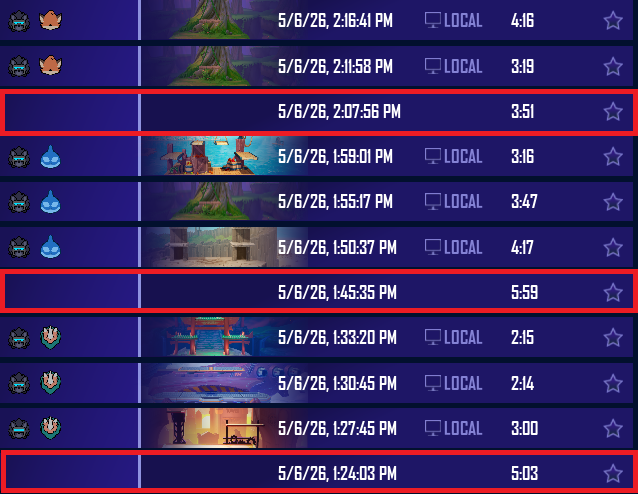 Example
of broken replays at the start of several sets
Example
of broken replays at the start of several setsAfter comparing broken
and non-broken replay files in a hex editor, I found
that the replay files broken in this way always have
a select set of missing bytes in the header that the
UI requires to be able to think it can play the replay.
These
bytes are not anything relatively interesting, just what the UI
uses to display what characters / stage / environment the set
was played on.
The replay file is still broken in other
ways, but
by adding these missing header bytes, it lets the game actually
play the replay file, albeit with some quirks outlined in the AFTER PATCHING section below.
WHAT IS
THIS NOT FOR?
This does not fix replays broken due to updates, and does not fix replays
that are broken in other ways. That said, this is generally the most observed way that
replays are "actually" broken in my experience.
If you want to play a replay that no longer
works due to a version update, the Dragdown Wiki has a guide going over
accessing older patches.
AFTER
PATCHING
The fixed replay will be located
one slot above the replay
that was broken, displaying as
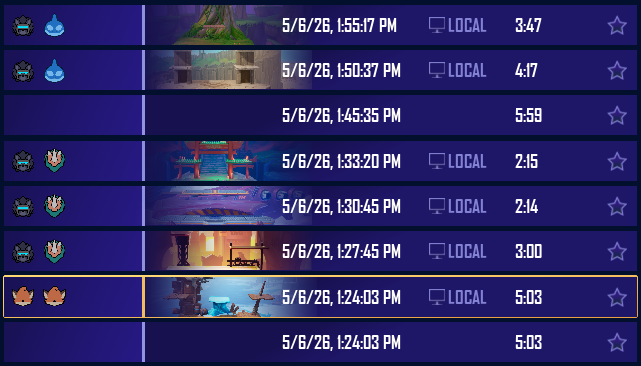
two Fleets on Harbor!
If you have not played an already
working
replay before attempting to play the fixed replay, the game
will crash when you try
to load it. It seems that loading a replay successfully
beforehand loads in some necessary assets for the fixed
replay to work correctly.
The replay will start
on the character select screen. You
must watch yourself pick
characters and wait for the set to start.
If you
rewind to before the beginning, you will jump back to the
CSS and must wait again, so
be careful about
scrubbing at the start!